RestroPress MultiLocation extension helps store owners to sell their food items that have multiple locations(branches) of their business. This extension enables you to sell your food items from different locations(branches) of your store.
The plugin gives your customers the option to choose a location from where they want to place their order. It supports both delivery and pickup. This plugin also integrates with our delivery fee extensions. If you have multiple pickup points and you want your customers to specify a location when placing the order.
This extension also helps you to sell different items for different branches. You can specify the location when creating food items so that it shows those food items when a customer chooses the location.
You can find the screenshots and brief information about how to set specific things in order to get this plugin working.
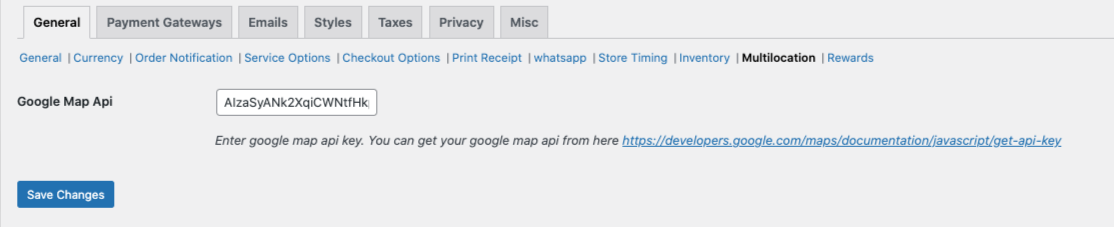
1. First of all you need to add the google map API key through this setting path
RestroPress -> Settings -> Multilocation -> Here you need to add the correct google map API key
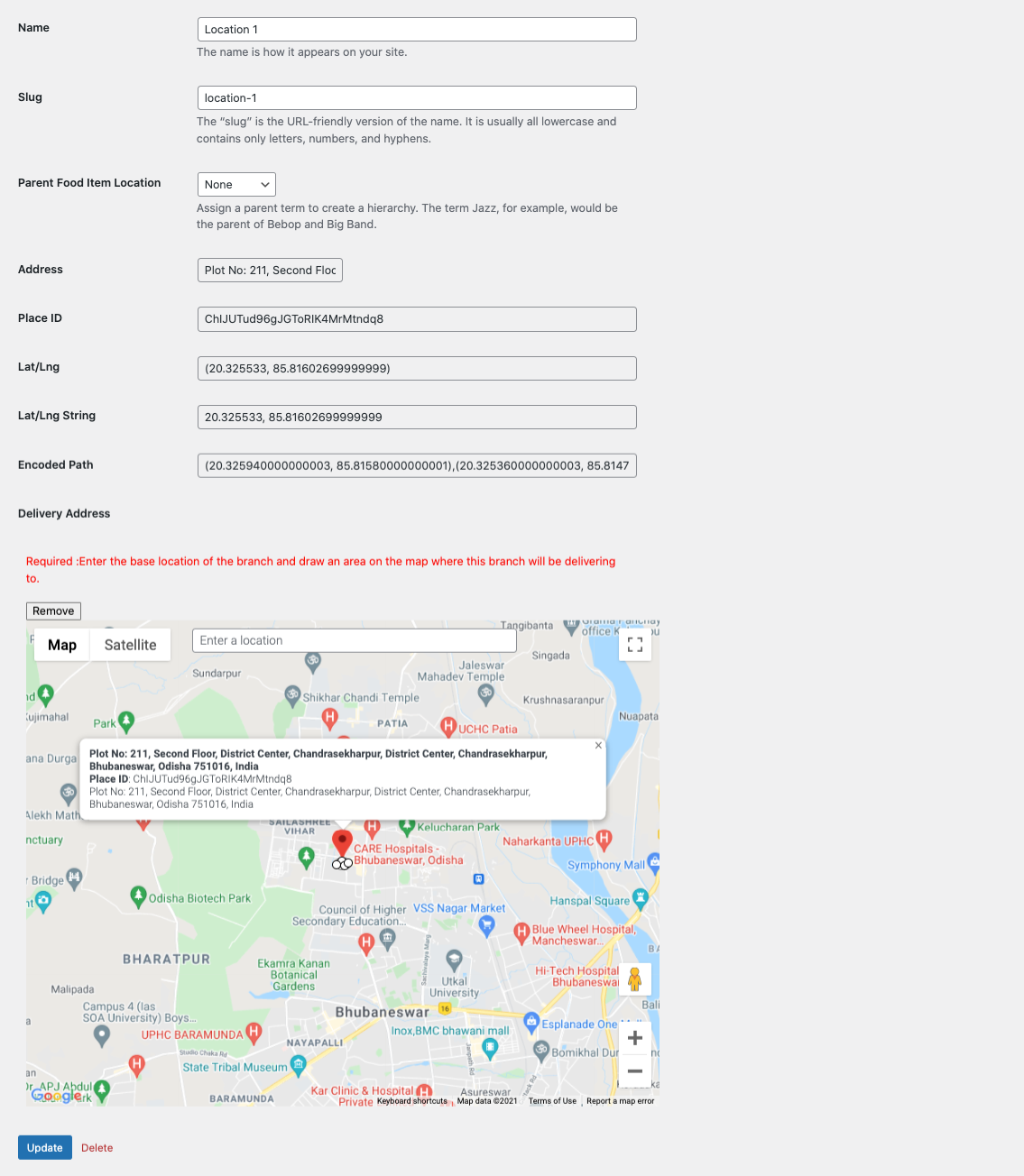
2. You need to set up your business locations through this setting path
Food items -> Locations -> Here you need to add your required location name -> Click on Edit -> On the map, you need to select the particular location area by drawing the line
Like this add the other locations as per your requirement.
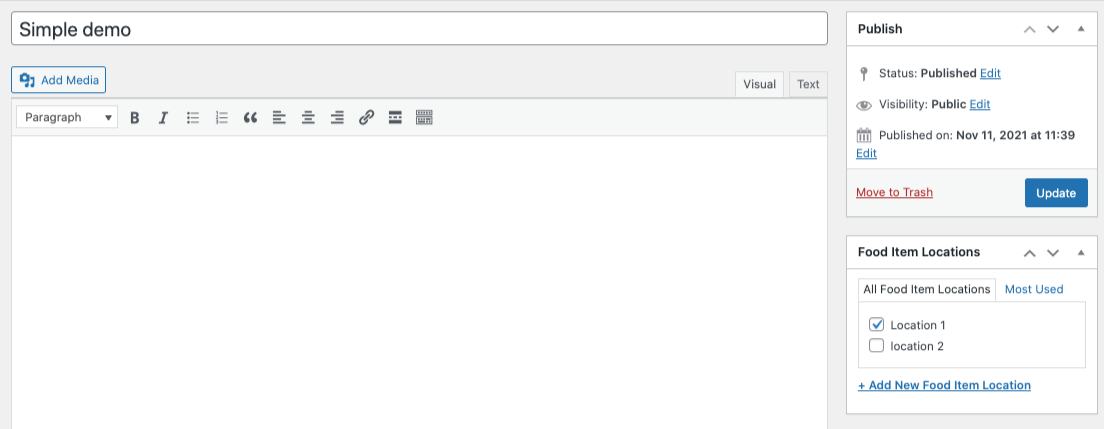
3. After adding the location, go to All food items and edit the food item.
Here on the right side, you can able to see the Food item locations.
You need to check the particular location for the particular food item.
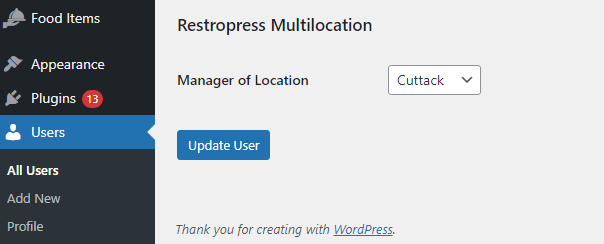
4. You can assign a Manager role for your different location and also if you are using the order tracking app then the manager can log in to the app by using his/her user Id and password details to manage the orders of the particular store.
To set up a manager role, you need to go through the settings Users -> Add a new user with the details and assign the user role as shop manager -> After creating the user click on Edit and go to the bottom of the page -> Here you can able to see an option Manager of Location -> Here you need to select the particular store location for this manager person
Note: The manager role feature is available from 1.1 version.
Get ALL of RestroPress extensions and save more or just buy this extension.
Version 2.0 (03 March 2026)
* Updated: Plugin version bump to 2.0
* Fixed: Force-popup guard now prioritizes active tab state and resolved branch context, preventing unwanted popup reopen after Pickup branch update + page refresh.
* Fixed: Pickup branch update flow no longer reopens delivery schedule popup after page auto-refresh when a valid pickup branch is already selected.
* Improved: Force-popup validation now respects persisted branch context (`branch` / `rpress_chosen_location_id`) and active service type before opening.
* Improved: Service-type resolution during popup Update now follows visible modal controls to avoid pickup/delivery mismatch after refresh.
* Fixed: Delivery popup location block now stays above the service date row to preserve the Date -> Time sequence when used with Delivery Fee and Store Timing.
* Fixed: Google Places suggestions now initialize immediately in delivery popup after service-type switch or modal refresh.
* Fixed: Delivery autocomplete binding now targets the current address input and avoids stale reused instances.
* Added: Popup service-time hook support so delivery area selector is rendered correctly after pickup/delivery service switches.
* Improved: Delivery address input now uses full-width modal field layout to match date/time controls.
* Improved: Branch option cards now show branch address details clearly below the branch label for better selection context.
* Fixed: Update action remains disabled when no visible branch is available or selected for active service
* Fixed: Address update submit is blocked when branch selection is missing
* Improved: Branch prompt now checks active-service selection and avoids unnecessary force-open loops
* Improved: Delivery branch matching now prioritizes selected Google place lat/lng and stored delivery coordinates
* Added: Checkout branch-change link flow to clear cart/address context before redirecting to listing page
* Improved: Branch/store-position fallback now supports `rpress_chosen_location_id` cookie
* Fixed: Modal stale-open state recovery when popup container is not actually visible
* Improved: Listing reload after successful branch update for consistent service context
* Added: Persistent branch memory (cookie/localStorage) so returning users keep their last selected branch.
* Improved: Service-type state sync across listing interactions and popup edit flow.
* Improved: Delivery location matching with Google geocoding + polygon boundary checks for valid-area filtering.
* Improved: Better branch/location validation flow for pickup vs delivery in AJAX handlers.
* Improved: Popup UX for long location lists with scrollable sections and stable update button visibility.
* Improved: Pickup modal now hides delivery address input and shows pickup-relevant options only.
* Updated: Script/style versioning now uses plugin version for stable cache behavior.
* Updated: Cookie persistence window extended for branch/location continuity.
* Security: Sanitized Google Maps API key handling before script enqueue.
* Added: Shared Google Maps API key compatibility with Delivery Fee (single key integration across both extensions)
* Improved: Delivery Fee branch-origin compatibility by wiring selected branch coordinates to delivery distance calculation
* Improved: Delivery Fee validation is now prioritized in delivery mode before showing selectable branches
* Fixed: When Delivery Fee reports invalid address/zipcode, delivery branches are hidden and stale branch selection is cleared
* Improved: Branch visibility now restores only after successful Delivery Fee address validation
* Fixed: Location selector script rendering issue on checkout by moving selection handlers into the frontend JS bundle
* Improved: Branch selection UI handlers now use delegated events for stable Update button behavior in service popup
* Fixed: Update action remains disabled when no visible branch is available/selected for the active service type
* Fixed: Address-update click is now blocked when branch selection is missing, preventing invalid modal submissions
* Improved: Branch force-popup checks active service selection and avoids reopening when a valid branch is already selected
* Improved: Delivery branch matching now prioritizes selected Google place lat/lng and stored delivery coordinates for stable filtering
* Added: Checkout branch-change link flow that clears cart/address context before redirecting to the item listing page
* Improved: Branch/store-position fallback now reads `rpress_chosen_location_id` cookie when direct branch payload is missing
* Fixed: Modal stale-open recovery when popup state is flagged open but container is not visible
* Improved: Listing page now reloads after successful branch update when required, keeping service context consistent
* Code Cleanup
Version 1.2 (09 September 2025)
* Fixed: Conflict issue with delivery fee extension
* Updated: After updating the location, clear the cart
* Code Cleanup
Version 1.1 (05 July 2022)
- Added: Branch address by using email tag
- Added: Assign branch manager to the particular locations
- Fixed: Checked Restropress plugin required validation
- Code cleanup
Version 1.0 (23 November 2021)