


Per-item stock quantities
Enter a stock number in the Inventory section of every food item, or change it from Quick Edit on the food items list. Stock drops automatically with each order.

Set stock quantities per item and addon, get a low-stock email before you run out, mark items sold out automatically at zero, and block over-ordering with stock checks at checkout.
Included in Starter, Professional, Business, AgencyOnly need this one? Buy it on its own from $49 / year
 RESTROPRESS · OPERATIONS
WHAT INVENTORY MANAGEMENT ADDS
Enter a stock number in the Inventory section of every food item, or change it from Quick Edit on the food items list. Stock drops automatically with each order.
Track stock for individual addon options too. An addon at zero is greyed out on the menu and blocked at checkout while the dish itself stays on sale.
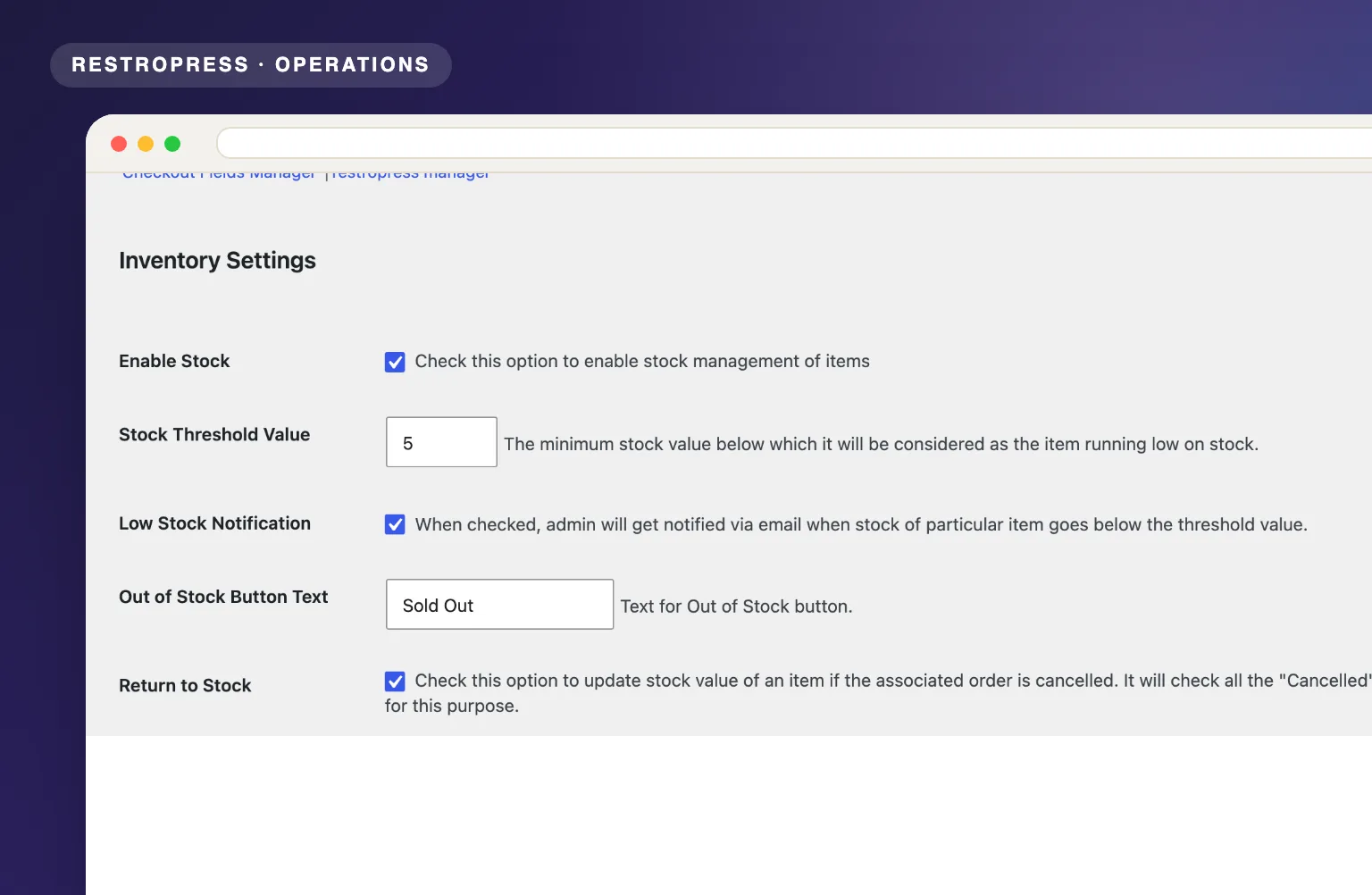
Set a threshold and get an email at your store address whenever an order takes an item down to that level or below.
At zero stock the Add button becomes a Sold Out label with the text you choose, and the item cannot be added to the cart.
The cart is validated when customers proceed to checkout and again on purchase, so nobody can order more than you have left.
When an order is marked Cancelled, the quantities it held go back into stock, once, with no manual counting.
Mark food items Available or Unavailable in bulk, filter the list by availability, and flip addon availability with a toggle on the addon list.
One checkbox pauses all online ordering: every item shows as unavailable and the menu is greyed out until you switch it back on.
MAKE IT YOURS
Enter your stock once and Inventory Management keeps the menu accurate through the whole service.
Get setup guidanceGo to RestroPress > Settings > General > Inventory and tick Enable Stock. Set the Stock Threshold Value, the Out of Stock Button Text and whether to email you on low stock.
In the same section, turn on Add stock option in addon for addon-level stock, Return to Stock for cancelled orders, and Disable Empty Stock Items if items without a stock value should show as sold out.
Open Menu Items > edit item and enter a quantity in the Inventory section, or use Quick Edit on the list. For addons, open Menu Items > Add-ons and edit the addon option.
PLANS & REQUIREMENTS
OPERATIONS EXTENSION
Compare the complete feature list to see which plan fits the rest of your setup.
1 WEBSITE
$199/ year
5 WEBSITES
$429/ year
15 WEBSITES
$799/ year
30 WEBSITES
$1,499/ year
BUY THIS EXTENSION ONLY
Yearly licence, cancel any time. Pick how many websites you run.
Licence key and download appear in your account right after checkout. Includes updates and support for this extension.
QUESTIONS, ANSWERED
CONTINUE EXPLORING

Set pickup and delivery time slots, cap orders per slot, and limit item quantities so your kitchen always runs at the right pace.
Included in Starter, Professional, Business, AgencyView extension
Every order placed through RestroPress is automatically sent to Clover POS. Import and export food categories, addon categories, customers, and orders between both systems.
Ask about pricingView extension
Let customers choose a branch, show location-specific menus, assign dedicated managers, and support both delivery and pickup across all your outlets.
Included in Professional, Business, AgencyView extensionYOUR NEXT DIRECT ORDER STARTS HERE
Explore the ordering experience, then choose the tools your team needs.

