Mollie

Connect Mollie to RestroPress and let customers pay via iDEAL, Bancontact, credit cards, Apple Pay, PayPal, SEPA bank transfer and more. Each method is its own switch in RestroPress, payment happens on Mollie's hosted page, and webhooks confirm the order, with no gateway or startup fees.

Free · no plan needed
RestroPress Mollie product visualRESTROPRESS · PAYMENTS
iDEAL, Bancontact, cards and Apple Pay from one Mollie connection.

WHAT MOLLIE ADDS

Payment choices for your checkout.

01

Sixteen Mollie methods, each its own switch

iDEAL, Bancontact, credit card, Apple Pay, PayPal, SEPA bank transfer, SOFORT, Giropay, EPS, KBC/CBC, Belfius, ING Home'Pay, Przelewy24, MyBank, paysafecard and gift cards. Each shows only when Mollie offers it for your account, currency and order total.

02

Webhook confirmation

Every payment carries a webhook URL back to your site. Mollie's status updates mark the order paid, failed, expired or refunded, and an optional status check on the confirmation page covers sites where webhooks are blocked.

03

Refunds both ways

Set the order to Refunded and tick Refund Charge in Mollie to refund through the API, or refund in the Mollie dashboard and the webhook updates the order, noting partial refunds too.

04

Test mode

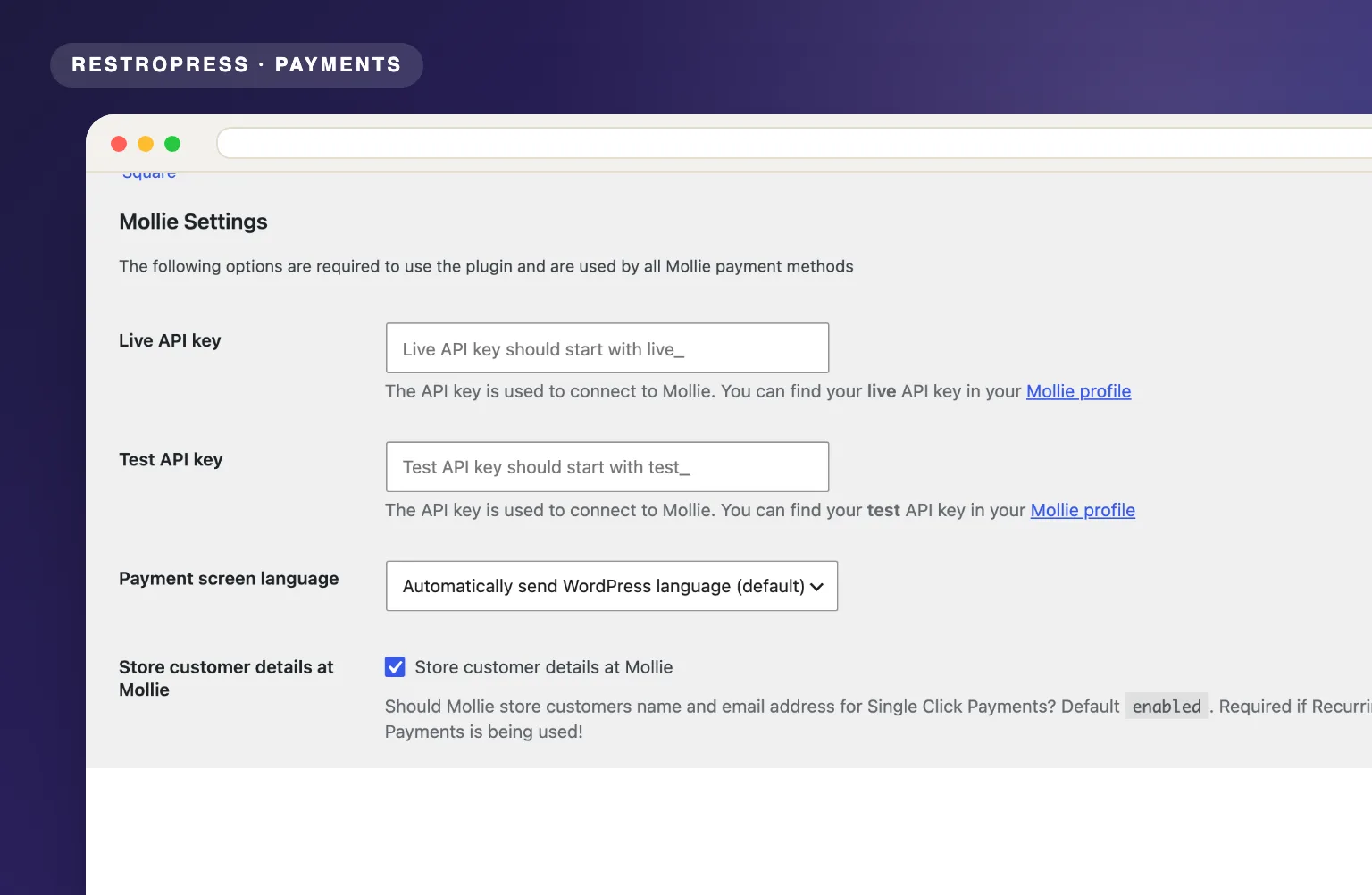
Enter both a Live API key and a Test API key. RestroPress test mode switches to the test key and Mollie's test payment screen.

05

No gateway or monthly fees

Mollie charges per transaction only. No setup cost, no subscription.

06

Speaks the customer's language

The payment screen language follows the WordPress or WPML language, or the browser, or a fixed locale you choose from 21 options.

07

PCI-compliant

Payment details are entered on Mollie's hosted page, so no card data touches your WordPress site.

MAKE IT YOURS

From setup to service.

Four steps from a Mollie account to a full menu of Mollie payment methods on your checkout.

Get setup guidance
  1. 01

    Create a Mollie account

    Sign up at mollie.com, activate the payment methods you want in the Mollie dashboard and copy your Live API key and Test API key.

  2. 02

    Add your API keys to RestroPress

    Under Payment Gateways, Mollie, enter the Live API key and Test API key and pick the Payment screen language.

  3. 03

    Switch on your methods

    The Mollie section lists every method with an on/off toggle plus a Title and Description for each. Then enable them in the RestroPress gateways list.

  4. 04

    Test, then go live

    With RestroPress test mode on, payments use the Test API key on Mollie's test screen. Turn it off to go live. Webhooks need a publicly reachable site.

PLANS & REQUIREMENTS

The right tool. The right plan.

PAYMENTS EXTENSION

Free · no plan needed

Free for every RestroPress website. Download it below, no plan needed. Paid plans add the premium extensions and priority support.

FREE EXTENSION

Mollie is free. No plan required.

Download it now; enter your email at checkout and the file is saved to your RestroPress account for future updates.

QUESTIONS, ANSWERED

A few things to know.

Is Mollie available in my country?
Mollie serves businesses registered in most European countries, with the deepest local method coverage in the Netherlands, Belgium, Germany and Austria. Check mollie.com for the current list. Your customers can pay from anywhere Mollie accepts cards.
Which payment methods are included?
The extension ships switches for sixteen methods: credit card (Visa, Mastercard, Amex and more), iDEAL, Bancontact, Apple Pay, PayPal, SEPA bank transfer, SOFORT, Giropay, EPS, KBC/CBC, Belfius, ING Home'Pay, Przelewy24, MyBank, paysafecard and gift cards. A method must be active in your Mollie dashboard and switched on in RestroPress, and it only shows at checkout when Mollie confirms it is available for your currency and order total. Customers pick the method in RestroPress and complete payment on Mollie's hosted page, where iDEAL bank selection happens.
Are there monthly fees?
No. Mollie charges a fee per successful transaction and nothing else, with no setup cost, no monthly subscription and no minimum volume. Mollie pays out on the schedule you set in its dashboard, as often as daily.
Is it WPML compatible?
Yes. The extension reads the current WPML language and sends it to Mollie as the payment screen locale, so the hosted payment page appears in the language the customer is browsing in. You can also detect the browser language or fix one of 21 locales for everyone. That matters for restaurants serving mixed Dutch, French, German and English customers.
Can I refund from WordPress?
Yes. Open the order, change its status to Refunded and tick Refund Charge in Mollie; the extension creates the refund through the Mollie API and notes it on the order. If you refund in the Mollie dashboard instead, the webhook picks it up: a full refund marks the order refunded and a partial refund is recorded as an order note.
How do test mode and webhooks work?
Enter both keys. While RestroPress test mode is on, payments are created with your Test API key and no money moves. Each payment carries a webhook URL (index.php?rpress-listener=mollie_<method>) that Mollie calls when the status changes; the listener checks the order key and payment ID before updating anything. If your host blocks incoming webhooks, turn on Check payment status on order confirmation page as a fallback, and use Debug Log to trace events.


YOUR NEXT DIRECT ORDER STARTS HERE

See how it works for your restaurant.

Explore the ordering experience, then choose the tools your team needs.