The RestroPress Adyen Payment Gateway integrates Adyen’s secure card payment infrastructure directly with your RestroPress online ordering system. It renders Adyen’s secure payment fields on the checkout page, processes the transaction, handles 3D Secure (3DS) authentication redirect flows, and dynamically updates the order status using Adyen’s API responses and webhook notifications.
Key Features
- On-Site Secure Checkout: Renders Adyen’s official secure payment fields inline on your checkout page, keeping customers on your website.
- 3D Secure 2.0 (3DS) Redirects: Full support for 3DS redirect flows to comply with PSD2 and strong customer authentication (SCA) regulations.
- Dynamic Webhook Syncing: Dynamically updates order payment statuses in RestroPress via Adyen webhooks when payments are captured, authorized, or failed.
- Webhook HMAC Signature Verification: Built-in HMAC key validation secures webhook endpoints against unauthorized or spoofed payloads.
- Main Test/Live Toggle: Automatically switches between sandbox and production modes based on the primary RestroPress test mode setting.
Admin Configuration Fields
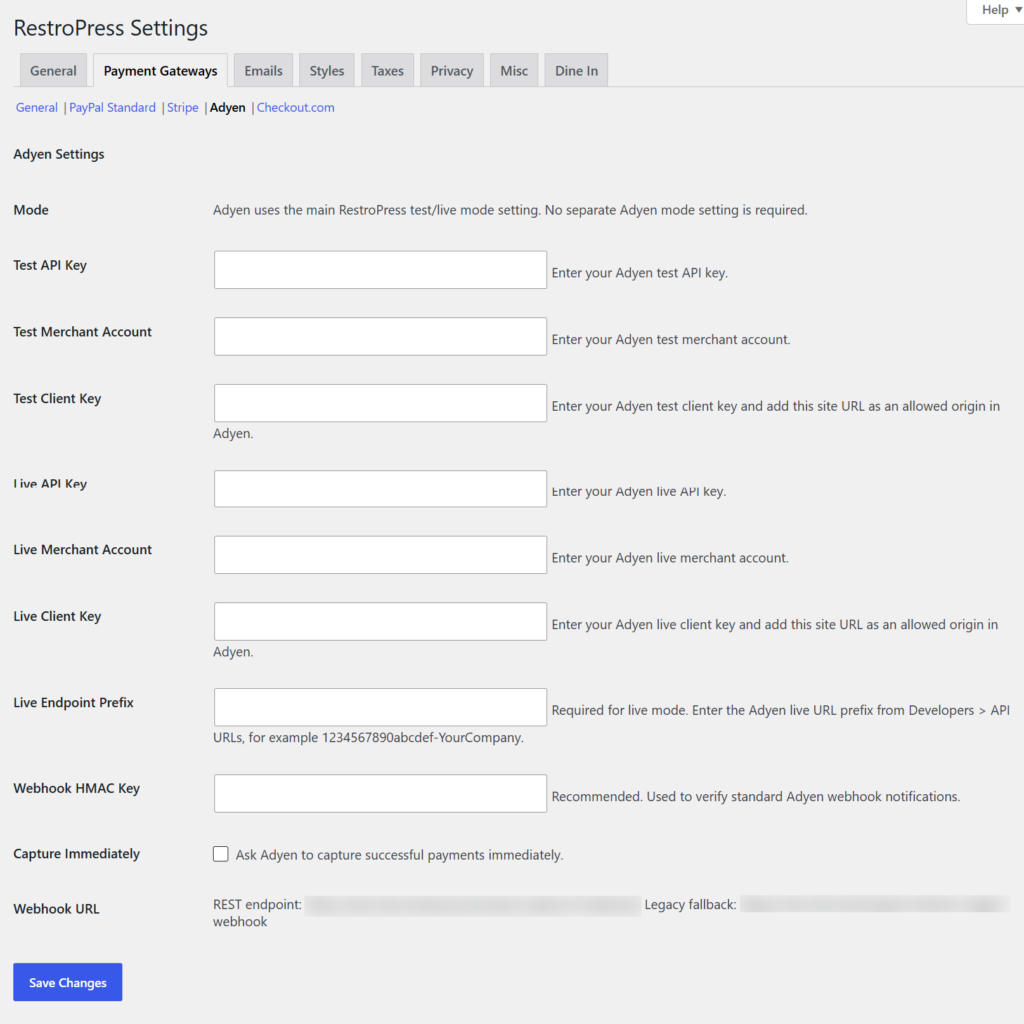
The extension adds a dedicated settings panel under RestroPress > Settings > Payment Gateways > Adyen containing:
- API Key (Separate fields for Test and Live keys)
- Merchant Account Identifier (Separate fields for Test and Live accounts)
- Client Key (Used to load Adyen secure fields securely on the frontend)
- Live Endpoint Prefix (Required to route production traffic to Adyen’s live servers)
- Webhook URL Display: Generates the exact endpoint URL to copy and paste into the Adyen Customer Area.
- Webhook HMAC Key: Field to enter your Adyen HMAC signature key to secure incoming notifications.
How to Install & Configure
- Upload the
restropress-adyen-payment-gateway folder to the /wp-content/plugins/ directory.
- Activate the plugin from the WordPress Plugins dashboard.
- Go to RestroPress > Settings > Payment Gateways and check the box to enable Adyen.
- Click on the Adyen settings tab and enter your Test and Live credentials (API Keys, Merchant Accounts, and Client Keys).
- Copy the automatically generated Webhook URL from the settings page and add it to your Adyen Customer Area, then paste your Adyen HMAC key back into the settings page to enable secure updates.